
Jump to content


Photo

Assign Colors

assign colors color colors floor plan color colored floor plan Paint

  • Please log in to reply
4 replies to this topic

#1 Jim Casali

Jim Casali

    Member

  • Members
  • PipPip
  • 13 posts

Posted 01 August 2024 - 03:35 PM

Hi everyone,


I want to start creating my floor plans in color to give a better visual presentation for clients. I started assigning colors in 'Drawing Options' and everything has been good so far.


My question is when assigning colors to symbols, is it possible to make each symbol its own color (ex. plumbing fixtures blue, oil/gas yellow, etc.)?


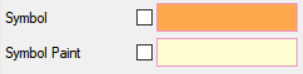
Also, what is the difference between 'Symbol' and 'Symbol Paint' and what difference does it make when checked or unchecked (see attached)?


Thanks in advance for any help!
Attached Thumbnails

  • Color.PNG


#2 Dennis Asher

Dennis Asher

    Advanced Member

  • Members
  • PipPipPip
  • 271 posts
  • LocationWillow Springs, Missouri

Posted 02 August 2024 - 06:45 AM

The only way I have found to do this is with layers. You can make everything on a layer a specific color whereas assigning a symbol color applies to all symbols.


  • Jim Casali likes this

#3 Mark Petri

Mark Petri

    Advanced Member

  • Members
  • PipPipPip
  • 1,994 posts
  • LocationEvergreen, CO

Posted 02 August 2024 - 09:38 AM

Symbol Paint makes the symbol filled with a color. Typically it does not look good in my opinion.


  • Jim Casali likes this

Mark Petri

Petri Building and Design


#4 Tarah King

Tarah King

    Member

  • Members
  • PipPip
  • 11 posts
  • LocationRiverside, Mo

Posted 04 August 2025 - 09:01 AM

The only way I have found to do this is with layers. You can make everything on a layer a specific color whereas assigning a symbol color applies to all symbols.

Dennis could you please go into further detail on how you execute and utilize the colors in layers? I'd like to do the same but within Building Options, would that be possible?
I am trying to elevate the plan sets and ease layer grouping to create pages for specified trades. The Building Option visibility toggle seems to allow me the most flexibility in creating/showing these groupings. TIA! tjk


#5 Dennis Asher

Dennis Asher

    Advanced Member

  • Members
  • PipPipPip
  • 271 posts
  • LocationWillow Springs, Missouri

Posted 07 August 2025 - 07:49 AM

Dennis could you please go into further detail on how you execute and utilize the colors in layers? I'd like to do the same but within Building Options, would that be possible?
I am trying to elevate the plan sets and ease layer grouping to create pages for specified trades. The Building Option visibility toggle seems to allow me the most flexibility in creating/showing these groupings. TIA! tjk

Hi Tarah, as it relates to colors and pen settings, Building Options works the same as Layers. I have set up a layer named "Plumbing Fixtures". There is a column named "Use Item(s) Color". If you uncheck this box, then you can pick whatever color you want that layer to be on the screen. If you wanted everything on that layer to actually print in a specific color, you could control that in the column labeled "Pen Settings". Additionally, you can control the items' line style the same way. Hope this helps.


  • David Zawadzki likes this


Also tagged with one or more of these keywords: assign colors, color, colors, floor plan color, colored floor plan, Paint

0 user(s) are reading this topic

0 members, 0 guests, 0 anonymous users